Product Updates: Household Updates and Bulk People Actions
One care note for the whole family, and a faster way to change many people at once. Both are live in every Notebird account today.
Hey friends,
At the end of our August update, we shared a short list of what was coming next. Two items on that list were household updates and bulk operations.
Both are live in your account today.
This is one of the biggest releases we have shipped. It changes how you write care notes for families, and it gives admins back hours of clicking. Let's walk through it.
👨👩👧 One update for the whole family
Care rarely happens one person at a time. You visit a couple at home. You sit with a family in a hospital waiting room. You drop off a meal for parents with new twins.
Until now, you had to pick one person for that note, or copy it onto each profile. Now you write it once.
Start an update on a person's page, and Notebird shows their family right in the form. Tap + Wes (Spouse) to add him. Write your note and save.
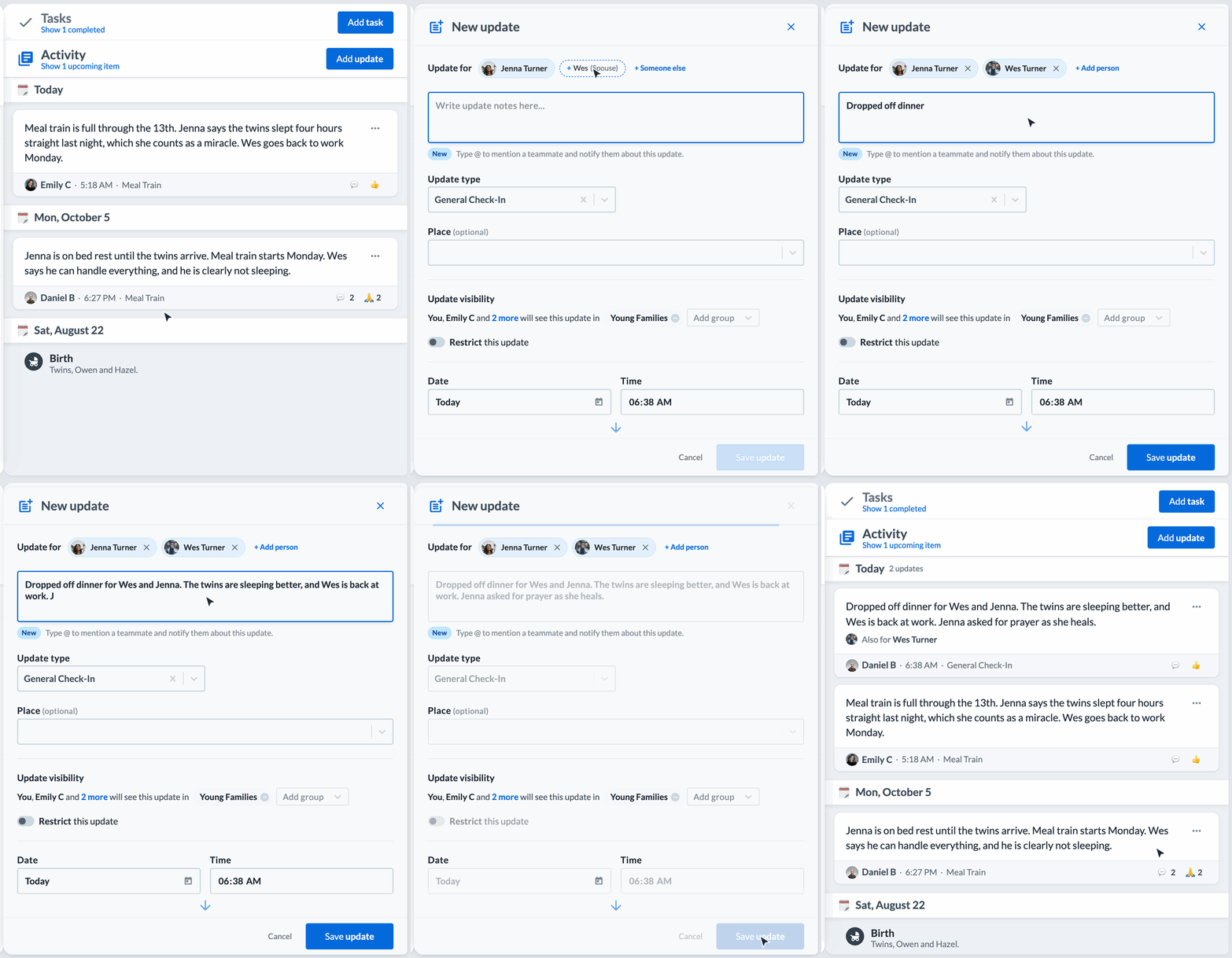
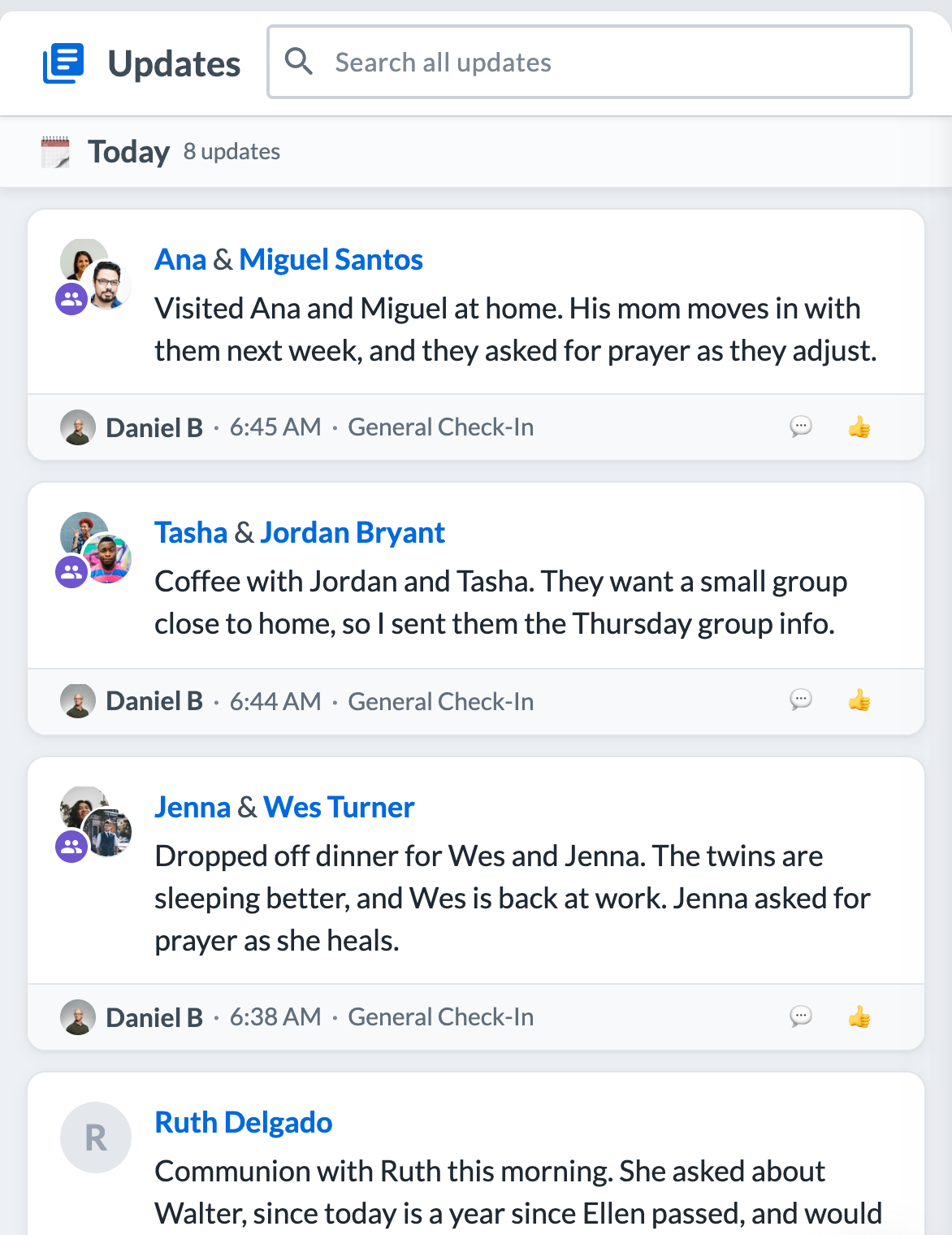
The update shows on each person's page, so the next teammate who opens Wes or Jenna sees the whole story. In the feed, you see both names and both photos together.
A few details we cared about:
- It counts once. Your reports count the visit one time, not once for each person.
- Everyone's care pulse resets. Each person on the update shows as cared for.
- It is not only for family. Tap + Someone else to add anyone else who was there. You can add up to 20 people to one update.
- Families come from your data. Notebird uses the Relationships on each profile. If Planning Center syncs your households, they are already there. You can also add relationships on any profile.
- Privacy stays the same. If a teammate can't open one of the people, they see "and 1 other" instead of that name.
You can also start from the round + button on the Activity page. Pick a person, and Notebird suggests their family.
Learn more: How do I create updates and tasks for a family?
✅ Select people and change them all at once
Every fall, care teams clean up their lists. New members join groups. Students move up. Some families move away. Before today, each change meant opening one profile at a time.
Now, on the People page, move your mouse over a person's photo and tick the box. On a phone, press and hold a row. Tick everyone you need, then pick an action:
- Groups: add people to groups, or take them out
- Archive or Unarchive
- Update: write one update for everyone you picked
- Task: give each person their own task
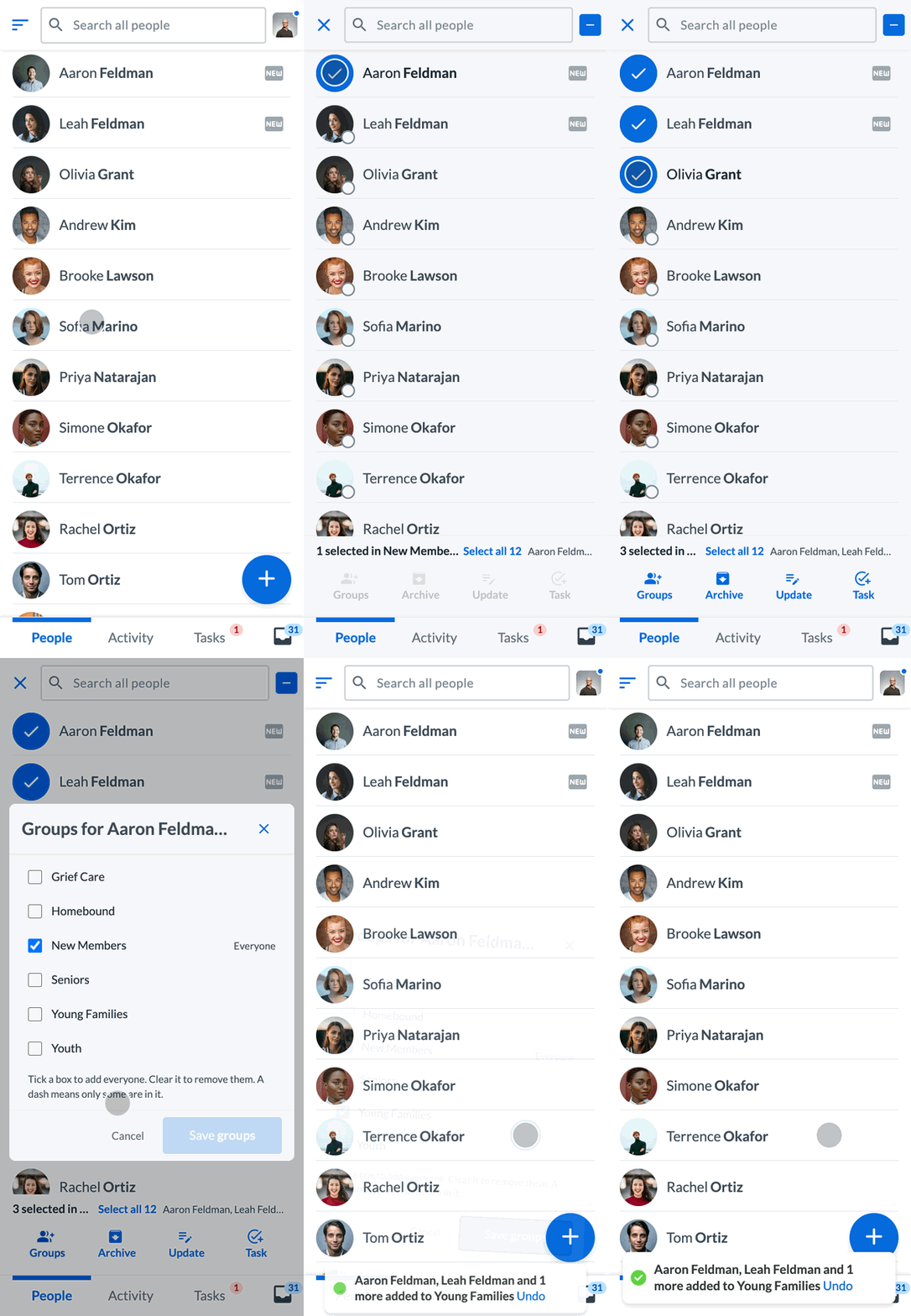
Need everyone in a list? Click Select all. It works for a group, a membership type, your followed people, archived people, and search results. Groups, Archive and Unarchive work on up to 5,000 people in one step. Update and Task work on up to 20 people at a time. Big changes run in the background, and your Inbox tells you when they are done.
Changed your mind? You have 8 seconds to click Undo after a Groups or Archive change.
The same permissions apply as when you change one person. Admins and Care Managers can change groups. Archived people can also be deleted in bulk by the teammates who are allowed to delete them.
Learn more: How do I select and change several people at once?
📋 One task for each person, written once
Some follow-ups belong to many people. The holidays are hard for people who are grieving, so you may want to call each of them before Thanksgiving.
Now you can select your Grief Care group, click Task, and write "Call before Thanksgiving" one time. Notebird makes a separate task for each person, so each call gets checked off on its own. The button tells you what will happen: Save 5 tasks.
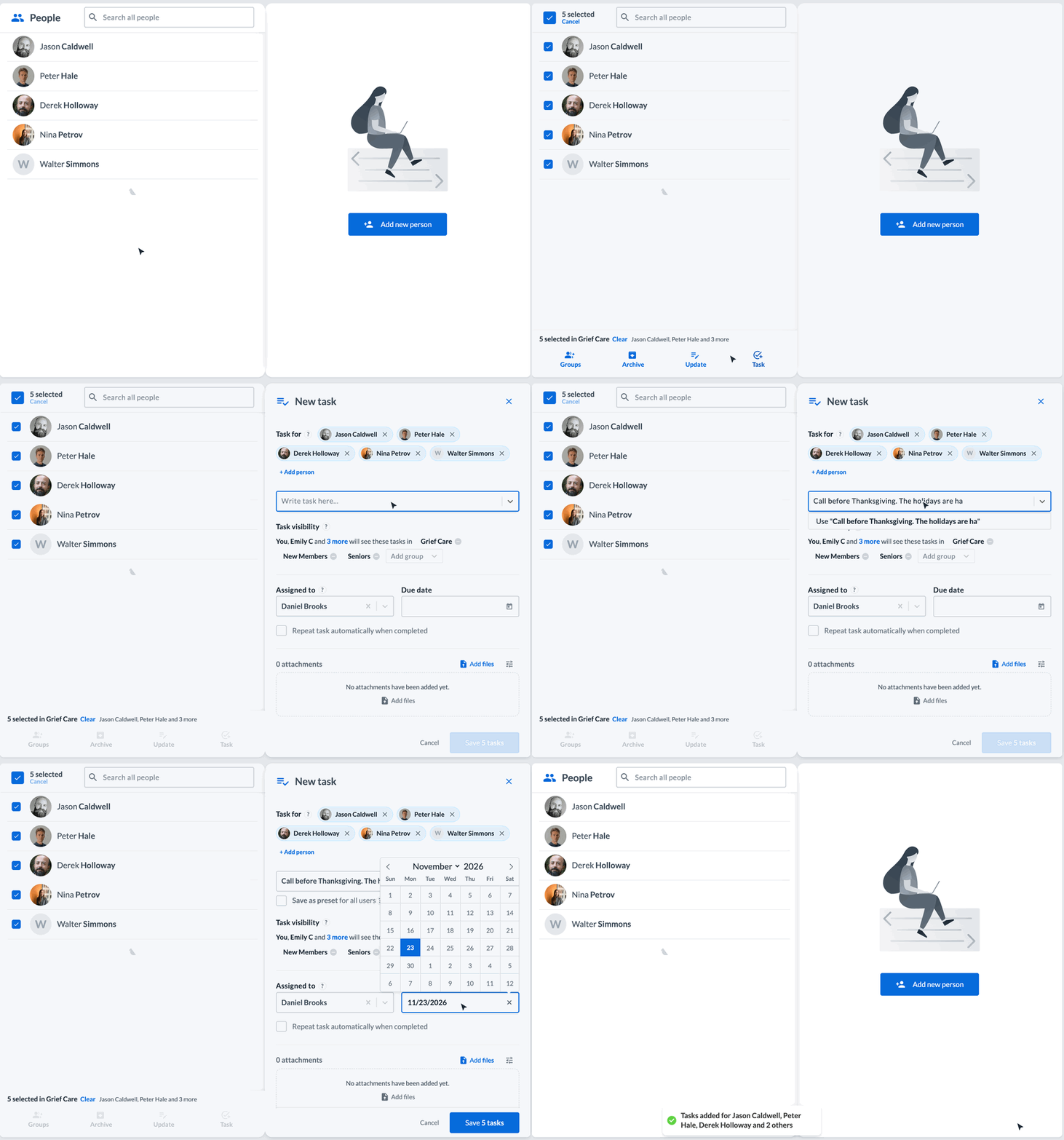
You can also start from the round + button on the Tasks page and pick the people there.
Learn more: How do I create updates and tasks for multiple people?
🐦 A Reach out list every Monday
Your Early Bird Report now comes every morning. Each Monday, it also suggests a few people to reach out to that week: people in your care who have not had an update in a while.
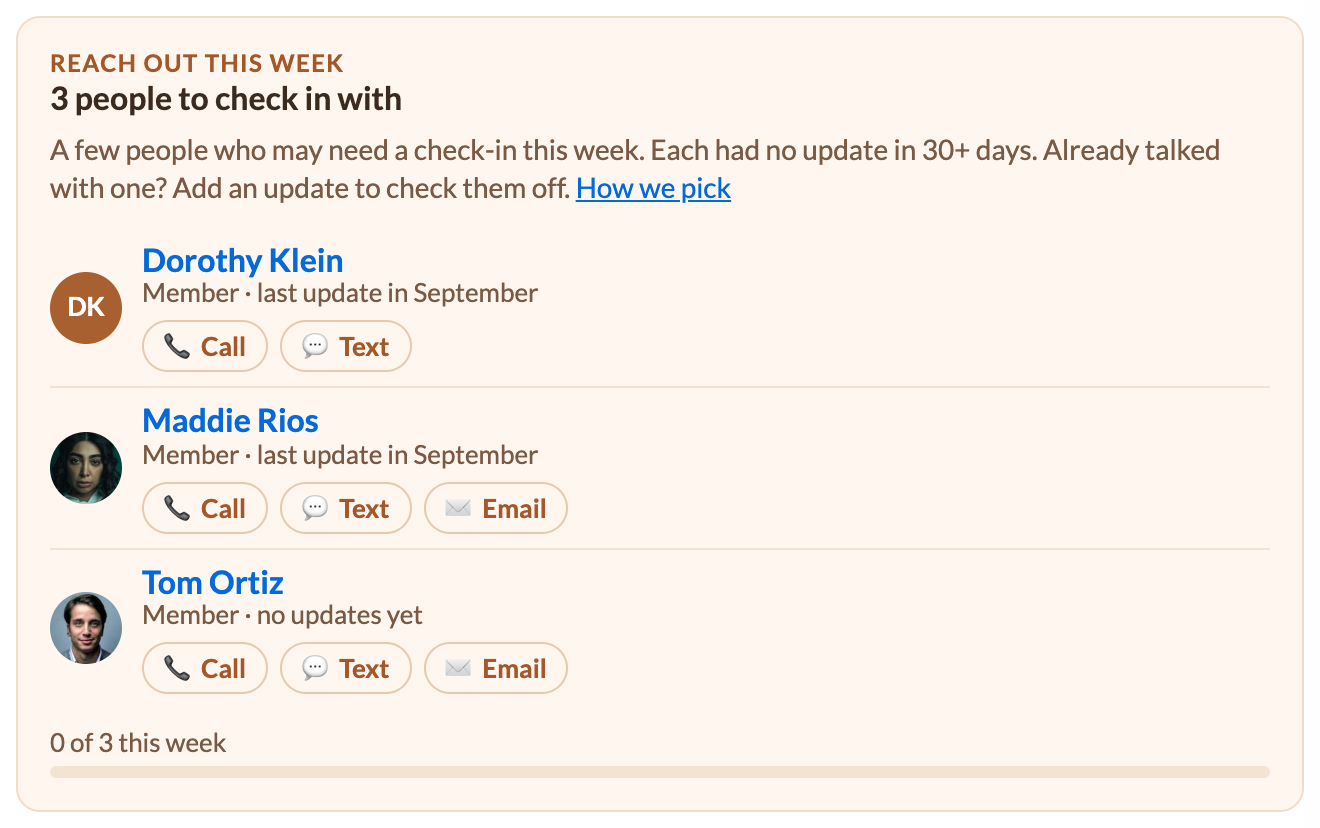
How Notebird picks people
Many of you have asked how the list works, so here is the short version. First, the why.
Why we built it. Most care starts with a crisis: a hospital stay, a death in the family, a hard phone call. Your team shows up for those moments. But the people who slip away are often the quiet ones. They are not in crisis, so nobody thinks to call, and months go by. Reach out is our way to come alongside you and help you notice them before they drift. A few names each week is a small, doable habit, and a short call, text or note often means more than you think. Over time, everyone in your care feels seen and known, and no one falls through the cracks.
How it works. These are suggestions, not tasks. Nothing is assigned to you, and nothing is due. And this is not AI. It is a simple rule based on the updates your team writes.
Each Monday, Notebird picks 3 people for you from the people in your care who:
- have had no update in 30 days or more, and
- had an update sometime in the last 6 months.
Among those people, Notebird looks first at people you follow, then members, then regular attenders, then everyone else. In each group, the person who has waited longest comes first.
If there is still room on your list, people with no updates yet can show up too: first people added in the last 30 days, newest first, then members and regular attenders.
A few more rules:
- Each teammate gets different people, so two people don't call the same person. A name repeats only when there aren't enough people to go around.
- Some people are never suggested: archived people, people marked as deceased, people you unsubscribed from, people in groups or membership types your admin left out, and anyone who already has a task or milestone in that day's report.
- Talked with someone? Add an update, and they get a check mark the next morning. Check off everyone on your list, and you get a small celebration.
- Admins can change it in Settings > Early Bird Reports: turn it off for the whole church, pick 1 to 5 people each week, or look back 1 to 12 months. The 30 days comes from your Pulse setting in Settings > Custom time ranges.
Want every detail? Read how the Early Bird Report picks people.
🔄 Membership types from Breeze, Church Windows and ShulCloud
If you sync with Breeze, Notebird now brings in each person's membership type. It uses the Breeze Status field, or another field you pick.
You can also choose who comes into Notebird: everyone, or only the membership types you care for, such as Members and Regular Attenders. People with care history are archived, never deleted, so their history stays safe.
Church Windows and ShulCloud now bring in membership types too.
Learn more: Breeze Sync: Membership Types
✨ Smaller things you will feel every day
- An easier-to-read activity feed. Each update and task now sits on its own card, with who wrote it, the time and the type at the bottom of the card, and a clear heading for each day. The text stays large.
- The People page opens right away, even for big churches.
- Back goes back. Open a person from Activity or Tasks, and the back button takes you to the list you came from.
- Pasted notes keep their paragraphs.
- Clearer Breeze alerts. If Breeze stops accepting your API key, Notebird tells you, and an admin can enter a new one.
🛠️ What's next
We are already building the next round. The biggest piece is one many of you have asked for.
A native Notebird app for iPhone and Android
You can already add Notebird to your phone's home screen. That works, but it runs in your phone's web browser, so it can't do everything a real app can. The new app is a native app from the App Store and Google Play, built for care that happens away from a desk:
- Alerts right on your phone when a task is due, a teammate mentions you, or your Early Bird Report is ready.
- One tap to call, text or get directions from a person's page.
- Log a visit in a few quick taps, from the parking lot, while it is still fresh.
- Your Early Bird Report becomes your Today screen, the first thing you see when you open the app.
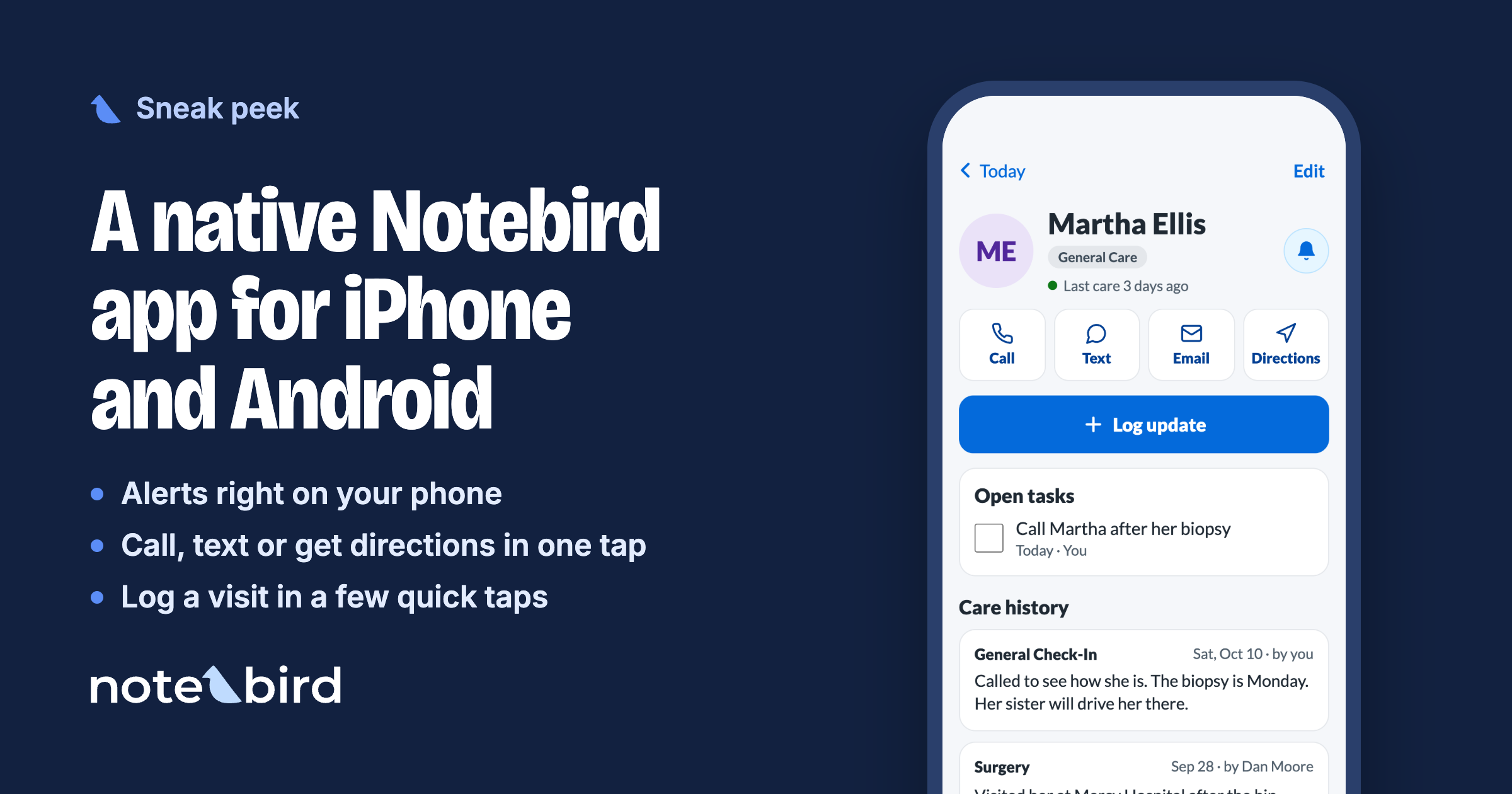
A first look at a person's page in the new app.
Also coming
- Care Workflows. Start a set of follow-up tasks for one person at once, after a death in the family, a surgery, or a new baby. Each step goes to the right teammate on the right day.
- Less typing twice. Better connections to the church tools you already use, so names and notes don't have to be entered in two places.
🙌 Try it today
Everything in this release is live in every Notebird account, on every plan. Open a person who has family linked, start an update, and tap their name.
Not on Notebird yet? Start your free 14-day trial. No credit card required.
Used Notebird before? A lot has changed. Email us or start a chat in the app, and we will get your account ready so you can try it again.
💬 Tell us what's next
Writing one update for more than one person was one of the oldest requests on our list. It is here because you kept asking.
So keep telling us. What would help your team care for people better? Reply to our email or start a chat in the app. We read every message.
To caring well together,
Thomas & The Notebird Team