Product Updates: Finally, Recurring Tasks Are Here!
Recurring tasks are live in Notebird. Set a care task once, such as a weekly call or a monthly visit, and it repeats on the schedule your team picks.
Published
Hey friends,
If you've been around Notebird for a while, you might remember that we teased this one at the end of our last product update. And if you filled out our recent NPS survey, there's a good chance you asked for it by name.
Today, it's here. Recurring Tasks are live in every Notebird account.
This is one of our most-requested features of all time, and we're thrilled to finally put it in your hands.
🔁 Recurring Tasks Are Here
Pastoral care is full of rhythms. Weekly check-in calls. Monthly visits. Quarterly meetings with your volunteer leaders. Annual follow-ups with families who've experienced a loss.
Until now, every time you completed one of those tasks, you had to manually create the next one. That meant remembering to do it, finding the right person, setting the right due date, and hoping nothing fell through the cracks in between.
Not anymore. Now you can set a task once, define how often it should repeat, and Notebird takes it from there. When you complete the task, the next one is automatically created and assigned, with the right due date already set and reminder notifications set up and scheduled.
No more forgetting. No more manual re-entry. Just consistent, faithful follow-through.
💡 How It Works
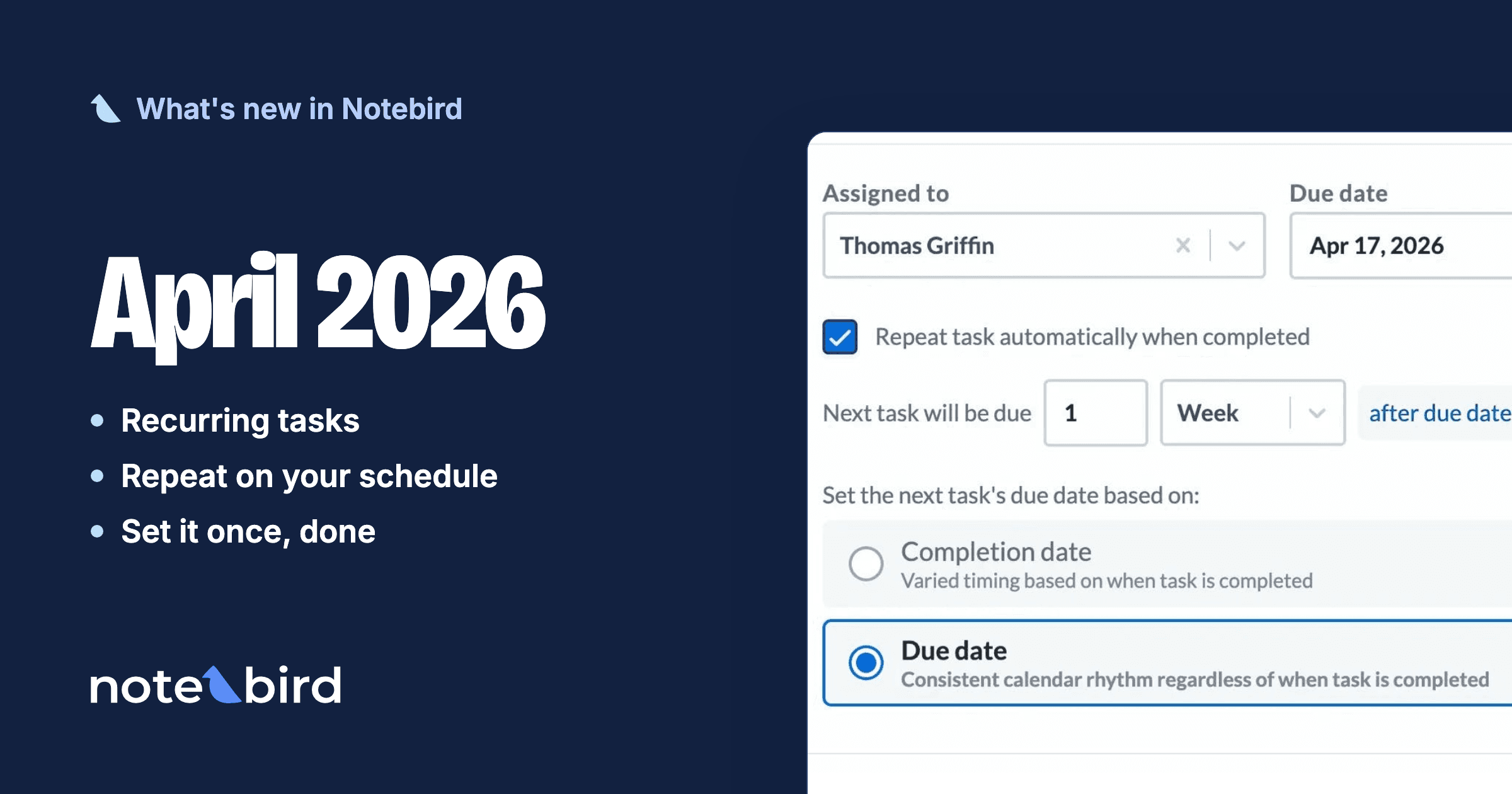
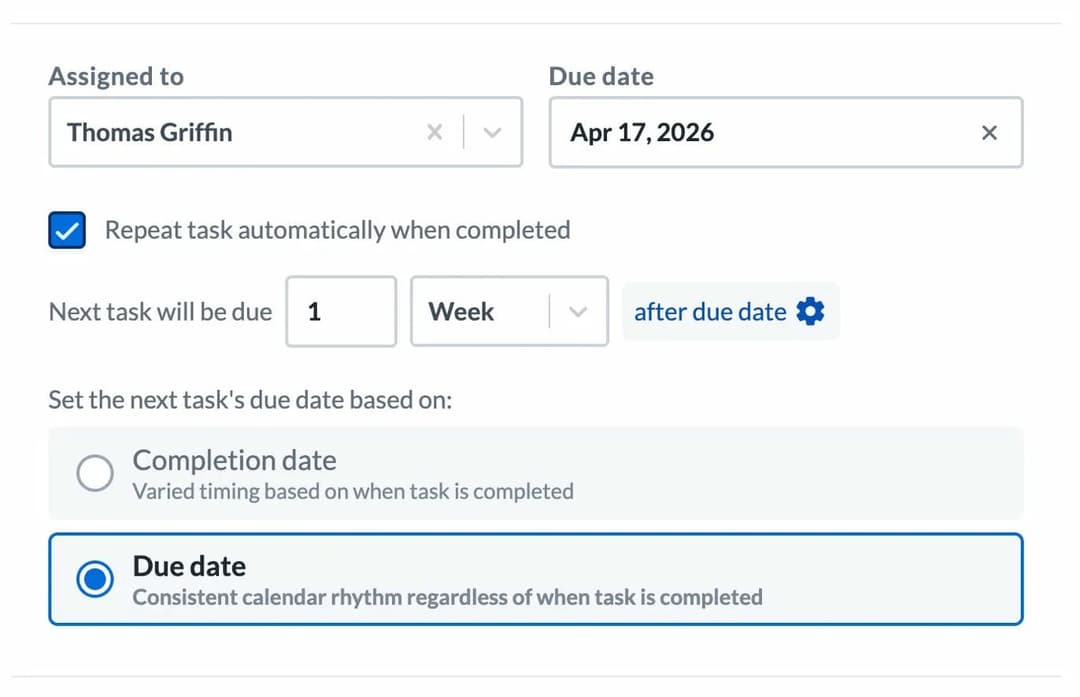
Setting up a recurring task is simple. When you create (or edit) a task, you'll see a new checkbox: "Repeat task automatically when completed."
Check that box and you'll get two options to configure:
1. How often should it repeat? Choose any interval that fits your rhythm: every 1 day, every 2 weeks, every 3 months, every quarter, every year. Whatever your team needs.
2. When should the next task be due?
This is where it gets powerful. You can choose between two modes:
- Due date: The next task's due date is always calculated from the original due date, not when you actually completed it. This gives you a consistent calendar rhythm regardless of when the task gets done. If your task is due every Friday, the next one is always due the following Friday, even if you complete it on Monday.
- Completion date: The next task's due date is calculated from when you mark it complete. This gives you flexible spacing that adjusts to real life. If you're a week late on a monthly visit, the next one is due a month from when you actually completed it, not a month from when it was originally due.
Both modes are useful, it just depends on whether you need a fixed cadence or adaptive timing.
🎯 Use Cases Your Team Will Love
Here are just a few of the ways we think Recurring Tasks are going to make your team's life easier:
Weekly check-in calls. You have a list of homebound members your team calls every week. Set up a recurring task for each one, assign it to the right team member, and it just keeps going, week after week, without anyone having to remember to recreate it.
Monthly visits. Your care team visits new families once a month for their first six months. Set the task, set the interval, and let Notebird handle the scheduling.
Quarterly volunteer leader meetings. Every quarter, you sit down with your small group leaders or volunteer coordinators. Now that task recreates itself every three months.
Annual follow-ups. A year after a death, a major surgery, or a life transition, you want to reach back out. Set a yearly recurring task and never miss that moment again.
Follow up on email. You sent an important email and need to follow up if you haven't heard back. Set it to repeat weekly until it's handled.
Recurring administrative tasks. Update your prayer list. Review your care dashboard. Send a monthly report to your senior pastor. All of these can now run on autopilot.
The common thread? You set it up once, and Notebird keeps your team on rhythm. No more tasks slipping through the cracks because someone forgot to create the next one.
🔮 What's Coming Next: Comments & Reactions
We're already hard at work on the next feature, and it's another one that came straight from your feedback.
Comments and emoji reactions are coming to updates and tasks. Soon, your team will be able to have quick conversations right inside Notebird: react to an update with a 🙏, leave a note on a task, or ask a clarifying question without leaving the app. It's going to make team collaboration so much smoother.
We can't wait to share more soon.
🙌 Try It Today
Recurring Tasks are available right now for every Notebird account. Log in, create a task, and check the "Repeat task automatically when completed" box to get started.
If you're not on Notebird yet, there's never been a better time to give it a try. Sign up for a free 14-day trial (no credit card required) and see how these features (and everything else Notebird offers) can help your team care for people better: https://my.notebird.app/signup
If your trial has expired but you'd like to take another look with all these new features, just shoot us an email or start a chat in the app. We're happy to reset your trial so you can experience everything fresh.
💬 We're Listening
Recurring Tasks exists because you asked for it. It showed up in our NPS surveys, in your support chats, and in conversations at conferences. We didn't just hear you: we built exactly what you told us you needed.
That's how we work. Your feedback shapes everything we build. If there's a feature, an improvement, or a small tweak that would make Notebird better for your team, tell us! Drop us an email or start a chat in the app. We read every message, and your ideas become our roadmap.
To caring well together, Thomas & The Notebird Team